
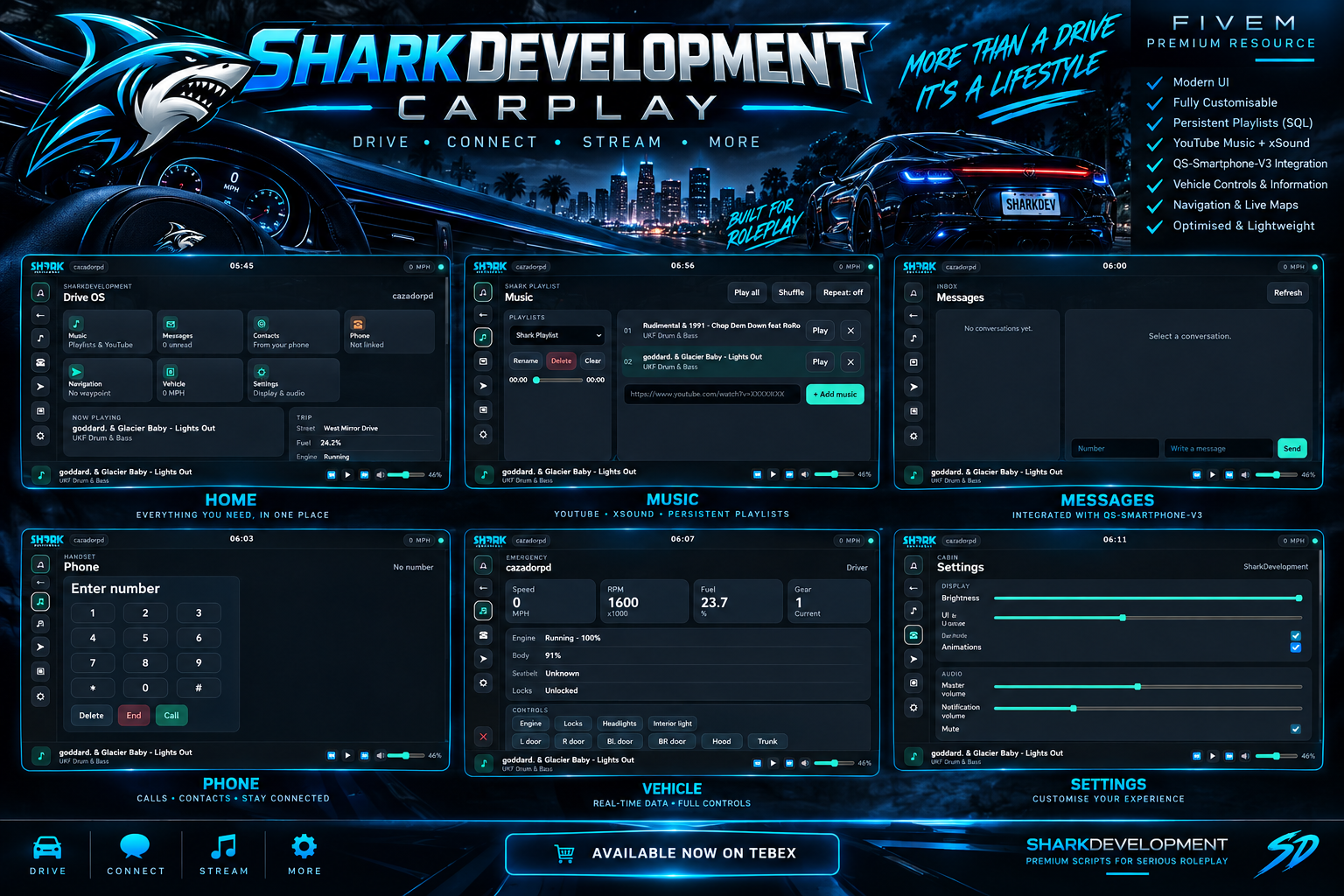
THE ULTIMATE IN-VEHICLE INFOTAINMENT SYSTEM FOR FIVEM
Transform the driving experience on your FiveM server with SharkDevelopment-CarPlay — a premium, modern, fully-featured in-vehicle infotainment system designed to bring your vehicles to life.
Built with performance, immersion, and roleplay in mind, SharkDevelopment-CarPlay gives players access to a powerful CarPlay-inspired touchscreen directly from their vehicle.
From streaming music through YouTube + xSound to sending messages through qs-smartphone-v3, this resource puts everything players need directly at their fingertips.
🚗 FEATURES
📱 Premium CarPlay Interface
A sleek, modern and responsive infotainment interface designed specifically for FiveM.
- Premium CarPlay-inspired UI
- Responsive interface
- Smooth animations
- Modern app layout
- Touch-friendly controls
- Customisable settings
- Dark premium design
- Optimised for multiple resolutions
🎵 YouTube Music + xSound
Turn your vehicle into a mobile entertainment system.
Players can enter YouTube links and play music directly through their vehicle's CarPlay system using xSound.
Music Features
- YouTube URL support
- xSound integration
- Play
- Pause
- Resume
- Stop
- Next
- Previous
- Restart
- Volume control
- Mute / Unmute
- Playback progress
- Seeking
- Shuffle
- Repeat
- Automatic next track
- Multiple playlists
🔊 Full Volume Control
Players have complete control over their music volume.
0% → 100%
Includes:
- Volume slider
- Mute button
- Unmute
- Saved volume preference
- Real-time volume updates
🎶 PERSISTENT PLAYLISTS
Never lose your favourite tracks again.
Players can create and manage their own music playlists, which are stored persistently in the database.
Playlists survive:
- CarPlay closing
- Leaving a vehicle
- Changing vehicles
- Disconnecting
- Reconnecting
- Resource restarts
- Full server restarts
Playlist Management
- Create playlists
- Rename playlists
- Delete playlists
- Add YouTube tracks
- Remove tracks
- Reorder tracks
- Play all
- Shuffle
- Repeat
- Clear playlists
- Multiple playlists per player
Players can build their own personal in-game music library.
💬 QS-SMARTPHONE-V3 INTEGRATION
SharkDevelopment-CarPlay integrates directly with qs-smartphone-v3.
Players can access their phone functionality without having to leave the vehicle interface.
Messaging
- View conversations
- Read messages
- Send messages
- Receive messages
- Unread message indicators
- Real-time message notifications
- Message previews
Contacts
Where supported by qs-smartphone-v3:
- View contacts
- Contact names
- Phone numbers
- Message contacts
- Call contacts
- Favourite contacts
Calls
Where supported:
- Dial numbers
- Call contacts
- Incoming calls
- Accept calls
- Reject calls
- End calls
Your existing phone system remains the source of truth — SharkDevelopment-CarPlay does not create an unnecessary second phone system.
🗺️ NAVIGATION
Get where you're going without leaving CarPlay.
The Navigation application provides:
- Current location
- Destination
- Distance
- ETA
- Current street
- Destination street
- Live navigation information
- Waypoint integration
Perfect for realistic civilian, emergency service and serious roleplay servers.
🚘 VEHICLE INFORMATION
Turn the infotainment system into a vehicle dashboard.
Display live information such as:
- Vehicle model
- Current speed
- RPM
- Fuel
- Engine status
- Engine health
- Body health
- Current gear
- Seatbelt status where supported
Supports:
MPH
and
KM/H
🔐 VEHICLE CONTROLS
Where supported by the vehicle/game:
Players can control:
- Engine
- Doors
- Windows
- Headlights
- Interior lights
- Vehicle locks
Designed with compatibility in mind so it can work alongside existing vehicle scripts without unnecessarily overriding them.
🔔 SMART NOTIFICATIONS
Receive important notifications directly through CarPlay.
Supported notifications include:
- New messages
- Incoming calls
- Navigation updates
- Music notifications
- System notifications
Example:
NEW MESSAGE
John
Are you coming to the station?
⚙️ FULL SETTINGS SYSTEM
Give players control over their CarPlay experience.
Display
- Brightness
- UI scaling
- Dark mode
- Animations
Audio
- Music volume
- Notification volume
- Mute
CarPlay
- Auto-open
- Driver-only mode
- Notifications
Music
- Resume playback
- Automatic next track
- Shuffle
- Repeat
💾 AUTOMATIC DATABASE SETUP
Installation is simple.
You do not need to manually create the CarPlay database tables.
On first startup, SharkDevelopment-CarPlay automatically:
- Checks the database
- Creates missing tables
- Creates player settings
- Creates default playlists
- Handles database versioning
- Preserves existing data
- Runs safe migrations when required
No manually importing SQL is required.
⚡ PERFORMANCE
SharkDevelopment-CarPlay has been designed with performance in mind.
Features include:
- Optimised client loops
- Event-driven functionality
- Minimal idle processing
- Efficient NUI communication
- Efficient database queries
- Server-side validation
- Clean xSound management
- Automatic resource cleanup
When CarPlay is closed, unnecessary processing is reduced as much as possible.
🔒 SECURITY
Security is a major part of the resource.
The system includes:
- Server-side validation
- Parameterised SQL queries
- Playlist ownership validation
- URL validation
- Input sanitisation
- NUI validation
- Protected server events
- Player identifier validation
Players cannot simply access another player's playlists or modify their data.
🎨 PREMIUM SHARKDEVELOPMENT DESIGN
Designed and developed under the SharkDevelopment brand.
The interface combines:
Modern UI + Automotive Design + FiveM Roleplay
to create an immersive experience that feels like a genuine vehicle infotainment system rather than another basic FiveM menu.
🧩 CONFIGURATION
Almost everything is configurable.
Including:
- Framework
- QBCore resource
- Database
- Phone resource
- xSound resource
- Commands
- Keybinds
- Driver restrictions
- Speed units
- Default volume
- Maximum playlists
- Maximum tracks
- Music features
- Navigation
- Notifications
- Vehicle controls
- Resume playback
- Debug mode
📦 REQUIREMENTS
Required
- FiveM
- QBCore
- oxmysql
- qs-smartphone-v3
- xSound
Recommended
A server using a modern QBCore-based setup.
🚀 INSTALLATION
Add the resource to your server:
resources/[sharkdevelopment]/SharkDevelopment-CarPlay
Then add:
ensure qb-core
ensure xsound
ensure qs-smartphone-v3
ensure SharkDevelopment-CarPlay
The database will automatically initialise on first startup.
Restart the server and players can use:
/carplay
or the configured keybind.
🦈 WHY SHARKDEVELOPMENT-CARPLAY?
PREMIUM
Designed to look and feel like a premium FiveM resource.
IMMERSIVE
Designed around realistic vehicle roleplay.
INTEGRATED
Works with your existing qs-smartphone-v3 system.
POWERFUL
Music, messaging, navigation, vehicle information and more.
PERSISTENT
Player playlists and settings remain saved.
OPTIMISED
Built with performance in mind.
CONFIGURABLE
Adapt the system to your server.
SECURE
Server-side validation and protected database operations.
PERFECT FOR
🚓 Police RP
🚑 Emergency Services
🚗 Civilian RP
🏎️ Racing Servers
🌆 Serious RP
🎥 Content Creator Servers
🎮 Community Servers
🔥 GIVE YOUR PLAYERS MORE THAN A CAR
SharkDevelopment-CarPlay isn't just another vehicle script.
It's a complete in-vehicle digital experience.
🎵 Stream music
💬 Stay connected
📞 Make calls
🗺️ Navigate
🚘 Control your vehicle
📱 Access your phone
🎶 Build persistent playlists
⚙️ Customise your experience
All from one premium interface.
🦈 SHARKDEVELOPMENT
DRIVE. CONNECT. STREAM. MORE.
Take your FiveM vehicle experience to the next level with SharkDevelopment-CarPlay.
Premium resources built for serious roleplay.